 Follow Us on Google News
 Follow Us on Google Discover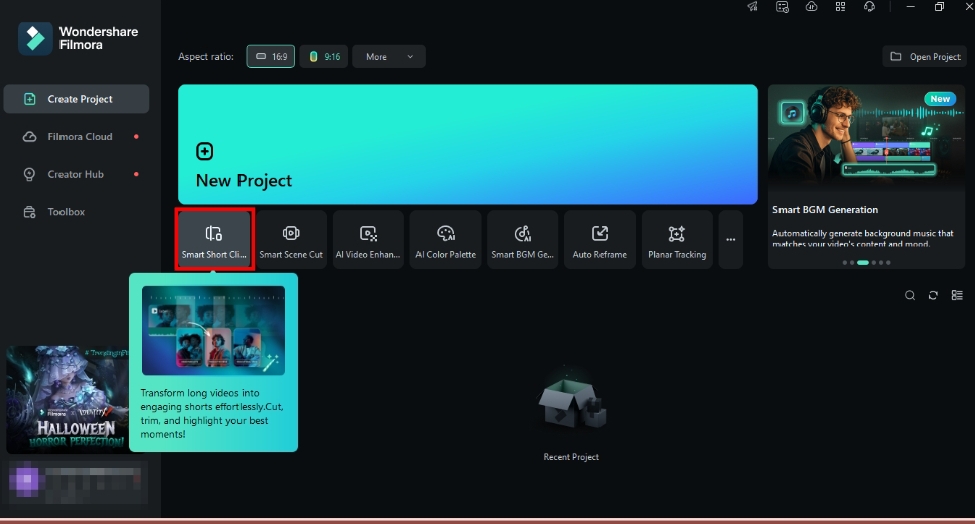
Are you looking to repurpose your long videos into more engaging short clips? We get it!
Short videos are taking over social media. They’re quick, easy to watch, and perfect for digesting information on the go. Besides social media, converting a long video to a short video can help you save time manually extracting scenes, allowing you to watch and edit faster.
[ad]
But the question is: how do you convert a long video to a short one?
This guide will tell you all about it! We will share the best video editors to streamline your short video creation. You will explore their lowdowns and a comparison table to help you find the best tool for your needs.
Let’s get started.
Part 1. What to Look for When Picking the Best Video Editor?
Before we talk about our top picks, let’s answer the question you might be thinking about: How do you find the best video editor to create short clips from a long video? Well, here are some things you should factor in:
- Ease of Use: The key intent behind converting long videos is to save time on manual clip creation. The video editor should simplify this process with its intuitive interface and fast performance.
- AI-Powered Features: You may want to avoid going through the technical editing steps. If so, look for a tool that creates AI-based smart short clips. This can save you time and effort.
- Preset Templates: Look for pre-designed templates for different social platforms. Presets for other purposes, such as marketing or education, can make the video more engaging for the target audience.
- Customization Options: While templates can speed up clip creation, you might need to tweak a few things. For example, you can customize the text, overlays, or transitions to enhance visual appeal.
- Social Media Optimization: Look for direct export options for social media sites, such as publishing directly on YouTube or TikTok. Otherwise, the tool should let you manually adjust the format.
- Supported Platforms: Find a tool that supports your computer or laptop’s system. It should be compatible with the OS and the relevant drivers.
- Pricing: The tool’s pricing structure should match your budget and usage needs. Consider whether you want a dedicated editing solution or a casual one.
Now that you know what to look for, let’s explore the best tools for repurposing long videos into shorter ones.
Part 2. Top Video Editors to Convert Long Video to Short Video
When it comes to the best video editors, you have several options. There are online video editors and ones you can install on your computer. We’ve included both to help you pick the one that fits your needs.
Let’s explore these together!
Are you looking for a long video to short video converter to create viral short clips without any manual editing? Filmora is just what you need!
It’s a powerful video editor available for Windows and Mac platforms. With its AI-based Smart Short Clips feature, you can quickly create multiple short clips from a single long video.
[ad]
Filmora lets you choose from various preset templates and adjust video duration and aspect ratio. The best part? You can generate clips of any theme, whether podcast, tutorial, or game. Once your clips are generated, Filmora’s advanced editing tools allow you to enhance them further.
You can add transitions, filters, and text overlays or apply advanced techniques like motion tracking and speed ramping for a dramatic effect.
Pros
- It automatically extracts the key scenes without manual editing.
- It rates the generated shorts based on their engagement potential.
- You can choose from over 50 preset templates to get started quickly.
- It lets you add music and voiceovers to narrate the video’s story.
- It automatically converts videos to different social media aspect ratios.
- You can customize everything, like captions, effects, transitions, etc.
Cons
- Converting long videos to short clips is not entirely free.
- It requires significant system resources for smooth performance.
Pricing
- With a Free trial.
Ratings
4.5/5 based on 695 reviews on Capterra.
4.4/5 based on 313 reviews on G2.
Steps to convert long video to short using Filmora
Step 1. Access Smart Short Clips
Download and install Wondershare Filmora. Launch it and select the “Smart Short Clips” option from the main screen.
Step 2. Upload Your Video
A window to convert long video to short video will open on your screen. From here,
- Click the “Click To Upload Or Drag The File Here” button to import your video.
- Copy/Paste your YouTube video URL in the link box.
- Click the “Filmora Cloud” button and select your video.
Step 3. Customize Settings
Wait for the video to import. Then, you can adjust its settings. To do this:
- Click the “Language” dropdown. Then, choose your video’s language.
- Select the runtime for the short clip under “Duration.” You can select from Auto, 0-30s, or 30-60s options.
- Choose the “Theme” of your video. It could be video podcasts, gaming, marketing, videos, etc.
Step 4. Advanced Options
Click the “Advanced” option. Select the aspect ratio from here. You can also enable Smart BG Generation and add keywords to generate animations.
Step 5. Choose a Template
Scroll down to the “Templates” section. Select the one that matches your video’s theme and click “Generate.” Then, wait for your video to process.
Step 6. Export Your Short Clip
Filmora will create multiple clips based on a specific theme. Select the clip you like and turn on “AI Speech enhancement” to improve the audio quality if needed. Then, click “Export.”
Note: Click the Edit button to adjust your clip. You can trim the video, customize text style, apply color corrections, and add filters, effects, or transitions.
[ad]
Step 7. Optimize for Social Media
Select your desired platform from the new window, such as YouTube, Vimeo, or TikTok. Then, choose the video’s title, description, resolution, etc., and click “Export.”
That’s how to convert a long video to a short video with Filmora. Let’s move on to the next tool in our lineup!
-
Veed.io
If you’re new to video editing but want professional-looking shorts, Veed.io has you covered. It automatically analyzes your video scenes and converts them to multiple short clips, complete with subtitles.
Once generated, you can add music, voiceovers, transitions, and filters to your shorts. The cool part is that all this happens online without needing any downloads.
Pros
- It supports creating shorts in a wide range of languages.
- It offers predefined aspect ratios for all social platforms.
- You can generate shorts based on goals like viral shorts or highlight reels.
- The generated videos are rated for flow, hook, interest, and engagement.
Cons
- Converting videos takes time based on the video’s length.
- There are no preset templates for shorts.
- Basic editing tools are not suitable for professional edits.
Pricing
- Monthly: $19/month
- Annual: $108/year
- Pro: $288/year
Ratings
4.6/5 based on 932 reviews on G2.
3.4/5 based on 52 reviews on Capterra.
-
Vegas Pro
Looking for a professional video editor to streamline your short video creation? VEGAS Pro can be your go-to! It offers AI-driven features to assist in converting long videos into shorter clips.
One key feature is smart scene detection. It automatically detects scene changes and splits the video into multiple short clips. Then, you can select and combine the clips you need. Besides scene detection, the Smart Split tool allows you to cut the video seamlessly without abrupt scene changes.
Pros
- Automatically detects and splits scenes for quick clip creation.
- Seamlessly removes unwanted segments, making it easy to trim videos.
- You can fine-tune the shorts with advanced editing techniques.
- It creates a large number of short clips in a single click.
- You can add subtitles to your shorts with speech-to-text conversion.
Cons
- There’s no AI-based automation in creating shorts.
- The extensive features can be overwhelming for beginners.
- AI features require a powerful system for best performance.
Pricing
- Monthly: $19.99/month
- Annual: $59.88/year
- Perpetual: $149/lifetime
Ratings
4.3/5 based on 104 reviews on G2.
4.6/5 based on 142 reviews on Capterra.
-
Vizard.ai
Vizard is a powerful online video editor that uses AI technology to convert long videos to short videos in minutes. You can upload your video or import it using the video URL. Then, Vizard allows you to select the video duration, multiple aspect ratios, and language.
You can also choose a preset template, but it’s optional. Once your clips are ready, you can edit them further. This lets you tweak captions, create more clips, customize the text style, video background, etc.
Pros
- You can generate over ten short clips from a single video.
- It automatically generates related keywords for your shorts.
- You can create clips with diverse aspect ratios from a single video.
- It gives each video a viral score with a brief explanation.
- You can publish the video directly or schedule it for later.
Cons
- It offers a limited number of preset templates.
- It lacks advanced customization tools to personalize the videos.
- It restricts video uploads by the number of minutes per month.
Pricing
- Free
- Creator: $128/ year
- Team: $384/ year
Ratings
4.7/5 based on 90 reviews on G2.
4.9/5 based on 136 reviews on Capterra.
-
Opus Clip
Opus Clip is a popular online long video-to-short video converter. It uses content-aware AI technology to extract the key scenes with the most viral impact. The tool also lets you add relevant emojis, highlight keywords, and use multiple layouts in a single clip.
Opus Clip has a ClipAnything feature that lets you extract specific moments from the video using simple text prompts. You can also use AI to automatically remove pauses and filler words and enhance speech.
Pros
- It automatically reframes the video with advanced AI technology.
- It easily transitions from single to split screen for multiple speakers.
- It extracts highlights based on visual, audio, and emotional impact.
- You can extract specific moments from the video using text prompts.
- It lets you create brand templates with customizable fonts and logos.
Cons
- The conversion time is slow for longer videos.
- Auto emojis may not work accurately.
- Limited manual selection of the clips before and after generation.
Pricing
- Free trial
- Monthly: $15/month
- Annual: $174/year
Ratings
4.7/5 based on 108 reviews on G2.
4.8/5 based on 171 reviews on Product Hunt.
-
Pictory
Pictory is an AI-powered video editing platform that converts long videos to short video content using transcription-based editing. You can select key segments based on the video’s text and turn them into multiple short-form videos.
This allows you to create unlimited clips from a single video. Its intuitive workflow makes it accessible for users with minimal video editing experience.
Pros
- Automatically transcribes long videos, allowing selection of key moments.
- You have complete control over selecting your desired sections.
- You can add branding elements like logos and custom styles.
- It allows automated b-roll suggestions and filler word removal.
- You can download transcripts and audio files separately.
Cons
- It only supports MP4 and MOV videos for input.
- Clip generation relies on the quality of AI-generated transcriptions.
- Features like scene editing and b-roll can be technical.
Pricing
- Free trial
- Starter: $228/year
- Professional: $468/year
- Team: $1,188/3 users/year
Ratings
4.7/5 based on 75 reviews on G2.
4.7/5 based on 151 reviews on Capterra.
Part 3. Comparison Table of the Top Six Long Video to Short Video Converters
Now that you’ve explored all the options for converting long videos to viral shorts, you might wonder which tool you should use. Here’s a comparison table to help you out!
| Tools | Scene Detection | Multiple Clip Generation | Preset Templates | Customizable Settings | Social Media Optimization |
| Filmora (Overall the best) |
Yes | Yes | 50+ diverse templates for short videos | Advanced | Automatic aspect ratio adjustment |
| Veed.io | Yes | Yes | No | limited | Automatic |
| Vegas Pro | Yes | Manual | No | Advanced | Manual |
| Vizard.ai | Yes | Yes | 8 preset layouts | Minimal | Four different aspect ratios |
| Opus Clip | Auto-detects engaging moments | Yes | No (You can create your own) | Minimal | Three options in aspect ratio |
| Pictory | Yes | Yes | No | Customizable aspect ratio, length, and style | Landscape, portrait, and square sizes |
With AI-driven Smart Short Clips, Filmora stands as the best long video-to-short video converter. It automatically detects the best scenes and generates multiple clips in one click. With over 50 templates and advanced customization options, you can create viral shorts for social media without much effort.
FAQs on Long Video to Short Video Converters
Q1. How do I choose the best parts of a long video for short clips?
Select the scenes that will move the audience. These could be emotional highlights or essential information. Skip filler words, pauses, and repetitive details. Focus on conveying the story with the most impact within a short duration.
Q2. What platforms are suitable for publishing short videos?
TikTok, Instagram Reels, YouTube Shorts, and Facebook prioritize short-form content. Shorts can easily capture the audience’s attention and drive more engagement. Being mobile-friendly, they’re also easier to watch on the go.
[ad]
Q3. How long should short videos be?
Short videos range between 15 and 60 seconds. However, this varies between platforms. TikTok and Instagram Reels are best kept under 30 seconds. YouTube Shorts can go up to 60 seconds for better engagement.
Final Words
That wraps up our guide on the best video editors to convert a long video to short video content. Whether a professional editor or a content creator, these tools can help you create engaging short clips for any social platform and boost your content’s visibility.
If you want to create shorts that drive interactions, we suggest using Wondershare Filmora. Its advanced AI technology will help you repurpose long videos into short-form content in just minutes. It requires no technical manual editing. Try it and supercharge your content creation!