Many people buy second-hand phones to save money, but hidden problems can cause trouble. Some devices may be stolen or locked, and buyers often don’t know. In this regard, a quick IMEI check with Dr.Fone Online will help you show the real status instantly and protect your money. So, to see how this works,review the listed guide and determine which safety measures you need after an IMEI check.
Part 1. Know Your Phone Before You Buy: IMEI Report Details Explained
An IMEI check gives you essential information about a phone before you buy it. It helps you avoid stolen, locked, or problematic devices as they review the detailed report. So, to know what this check report covers, adhere to the listed table:
|
What IMEI Reveals |
Why It Matters |
|
Blacklist Status |
Shows if the phone is reported lost or stolen to avoid blacklisted devices. |
|
iCloud/MDM Locks |
Indicates if the phone is locked to an account. Locked phones may not work. |
|
Carrier Locks |
Reveals if the phone works only on a specific network to ensure compatibility. |
|
Warranty Status |
Shows if the phone has a valid warranty. Helps with repairs if needed. |
|
Repair History |
Displays past repairs or damage. Helps assess phone conditions before purchase. |
Part 2. Why Dr.Fone Stands Out for Easy IMEI Verification
Unlike other tools that need complex setup, Wondershare has come up with an ideal tool, Dr.Fone Online IMEI Check, to check the device status in detail. The tool is designed with ease in mind, which not only offers global access but also allows users to get a detailed IMEI report within 60 seconds. Users just have to enter IMEI details and get a report, which is accessible for later use.
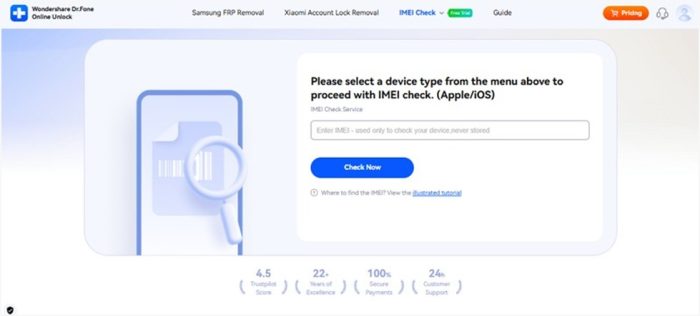
The foremost aspect is its support that offers 20+ types of device verification for all models of Android and iOS. Thus, this includes Blacklist Check, iCloud, and Blacklist Status, MDM Check, etc, for iOS. On the contrary, it offers details on Xiaomi Activation Lock Check, Samsung KNOX Guard, Samsung Warranty, etc, for Android models. With the first free check, the tool ensures global coverage and offers your updated
customer support.
Part 3. Step-by-Step Guide to Run an IMEI Check (Dr.Fone Online Guide)
For IMEI unlock check, learn how Dr.Fone Online IMEI Check operates and offers a detailed report via the listed guide:
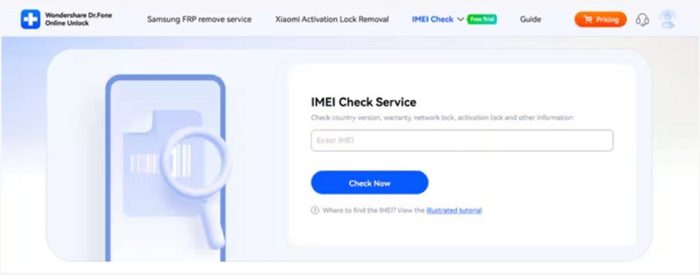
Step 1. Add the IMEI Number on the IMEI Check Tool
On the IMEI Check tab, choose if you want to perform a Samsung IMEI Check or a Verizon IMEI Check from the given tab. After that, enter the phone’s IMEI number and hit the “Check Now” button to let the tool verify details
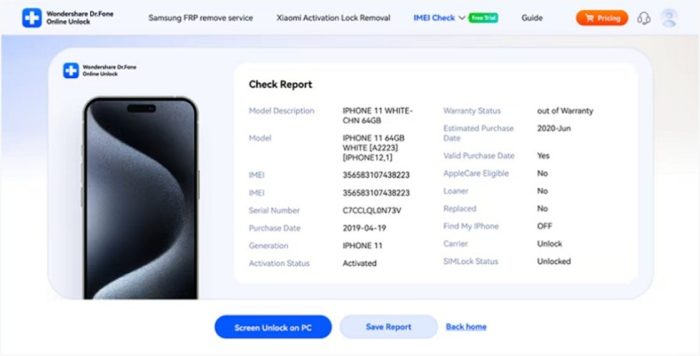
Step 2. Access the Details to Review & Save It If Needed
When the tool offers you a detailed report after 60 seconds, review it and transfer it to the device by picking the “Save Report” button.
Part 4. Red Flags and Real-Life Buying Scenarios for IMEI Checks
Despite having the details to unlock IMEI, many users still get stuck with locked or repaired phones. Thus, avoid this mishap promptly and review the possible red flags listed below with tips on how to avoid them:
|
Red Flag / Scenario |
What It Might Mean |
|
Seller Asks to Meet in Private |
The phone could be stolen, or there may be hidden issues. |
|
Device Priced Far Below Market |
The phone may be blacklisted, stolen, or faulty. |
|
Missing Original Box or Accessories |
Possible prior damage or incomplete device. |
|
Seller Refuses to Provide IMEI |
The phone may have locks or ownership issues. |
|
Phone Shows Scratches or Damage |
The device may have past repairs or hidden problems. |
Recommended Next Steps
● Always demand evidence of possession or original ownership to establish that the phone is of the seller.
● Inspect the IMEI report about the locks, blacklist, repairs, and concealed issues.
● Meet the seller at a secure location where there are people, and have a friend with you.
● Do not buy the phone if any red flags or suspicious results appear anywhere.
Part 5. Stay Safe: Combine IMEI Check with Carrier and Verification Steps
As you run a phone blacklist check, it is preferable to verify with the carrier and ensure that the phone is on your network and has no secret locks. In addition, always meet the seller in an open and secure area and have a friend with you.
In case the IMEI report gives ambiguous or suspicious results, call Dr.Fone Online support to get
clarification before purchasing anything. There, you will receive expert advice on the phone’s real status. Along with that, you will know whether the phone is safe to buy and receive instructions to avoid stolen, blacklisted, or locked devices.
Conclusion
To sum up, Dr.Fone IMEI Check is a trusted choice to verify if the phone is stolen or under warranty. So, review this guide and learn why you should opt for this tool over unsafe alternatives. With its comprehensive device verification and support, Dr.Fone Online is the only solution you nee