 Follow Us on Google News
 Follow Us on Google Discover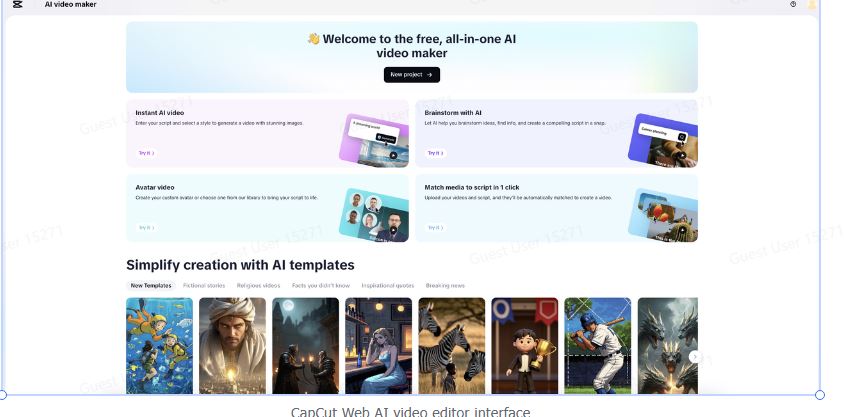
Welcome to a time when AI can make its own content. Since 2025, digital storytelling has changed a lot. People are interested in more than just editing software and voiceovers. They also want intelligent automation, voices that sound natural, and pictures that are based on characters. No matter if you’re a solopreneur, a teacher, an influencer, or part of an in-house brand team, you need tools that can do more with less time, effort, and money.
CapCut Web is leading the way in this transformation. It is a flexible AI video editor that comes with a full set of capabilities, such as AI video editing, free text-to-speech (TTS), voice effects, and AI avatars. It’s not just about speeding things up; it’s also about making them more creative and lively, showing how people will use content in 2025: short, expressive, multilingual, and full of pictures. Let’s talk about the primary things that make this AI-powered toolset so helpful. Core AI content creation features you need in 2025:
Stay ahead of the curve with powerful, time-saving AI tools that streamline video production, voiceovers, and storytelling. From avatar videos to voice changers, these features are built to help creators scale faster and smarter.
AI avatar video creation
You can make lip-synced avatar videos that look like they were made in a studio using only your script or the one generated from your prompt by AI. These avatars sound, look, and move like actual people, making them great for training modules, instructional videos, faceless branding content, and multilingual localization. You can choose from a variety of avatars that fit the demographics of your audience and the style of your presentation.
Script to video generation
Just paste in a prompt or upload a full screenplay, and CapCut Web will turn your ideas into movies. The AI creates your scenes, adds transitions, generates subtitles, and ensures the voiceover aligns with the flow of the visuals. This tool is a content director who can cut hours of editing down to minutes.
Pre-designed video templates
Don’t use the blank canvas. Choose from a library of video templates that keeps increasing. These templates are made for social media, product launches, business introductions, educational explainers, and more. Each template has optimized animations, placeholders, and timing for plug-and-play editing. This saves you time in both the creative and production stages.
Text-to-speech (TTS) voiceovers
Choose from dozens of AI-generated voices with varying tones, accents, and languages to make realistic, emotional narrations in seconds. The CapCut Web’s text to audio free engine enables you to match voice personality to message intent without employing any voice actors, whether you’re making a professional advertising video or a casual product review. Also, in this tool, you can either type or paste in the script for narration or enter a prompt and let AI draft narration content for you.
Voice changers and audio transformation
CapCut Web’s AI voice changer allows you to modify the tone or identity of any voice you upload or record. You can transform a serious narration into childlike playfulness, a robotic sci-fi voice into a deep, cinematic style, and more. It’s excellent for using duplicate voice content in numerous formats, for different age groups, or across various genres. You can also use it to change the tone of voices, hide them, or try out new ways of presenting stories with just one click.
How to turn your script into a video with CapCut Web: Step-by-step guide
CapCut Web’s AI tools make it easier than ever to turn text into engaging video content. Use the simple steps below to add voiceovers, images, and smooth edits to your script.
Step 1: Let AI craft your video script and narration
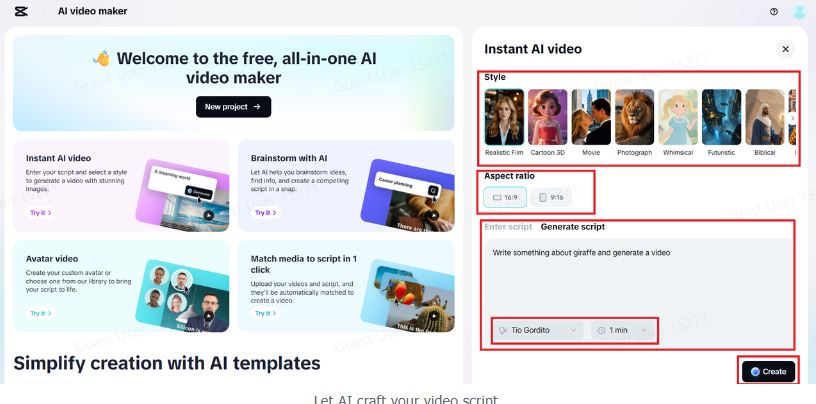
To get started, launch CapCut Web and choose “Instant AI Video” from the main menu. In the setup tab, pick the movie style and aspect ratio you want. Then, either enter it into your script manually or let the AI generate one for you based on your prompt. To see voice options for narration, click the left icon with a character name on the text box. Use the duration option to select the length of your video. Once everything appears to be in order, click “Create.” CapCut Web will automatically compile a complete video for you, incorporating images, AI-generated narration, and a structured format, so you won’t have to do any editing yourself.
 Step 2: Auto-build your video with visuals, music, and voice
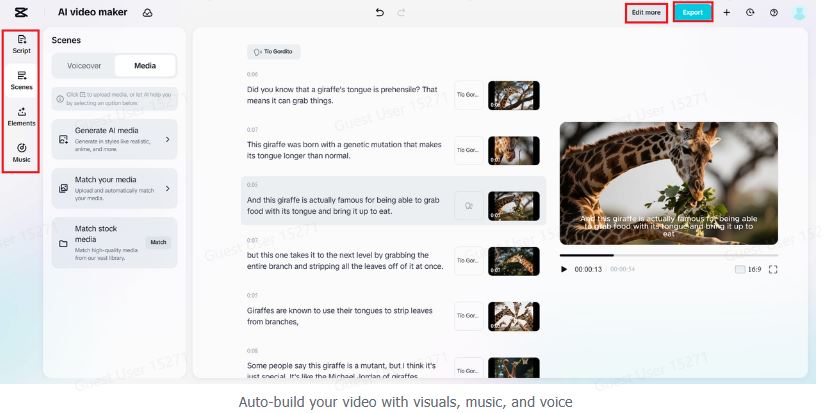
Once you’ve written your script and narration, CapCut Web compiles a full video draft for you, complete with scene changes, synced voiceovers, and moving subtitles. You can change the visuals by dragging in materials from CapCut Web’s massive stock library. This collection has HD footage, AI-generated media, music that doesn’t require a license, and animated text styles. Want to change the voice? You may easily change the AI voiceover or add your own audio. When you’re happy with the movie, you can either export it as is or click “Edit more” to make changes to every detail in the advanced AI editor, such as transitions, effects, layouts, and animations.
 Step 3: Customize every detail and download instantly
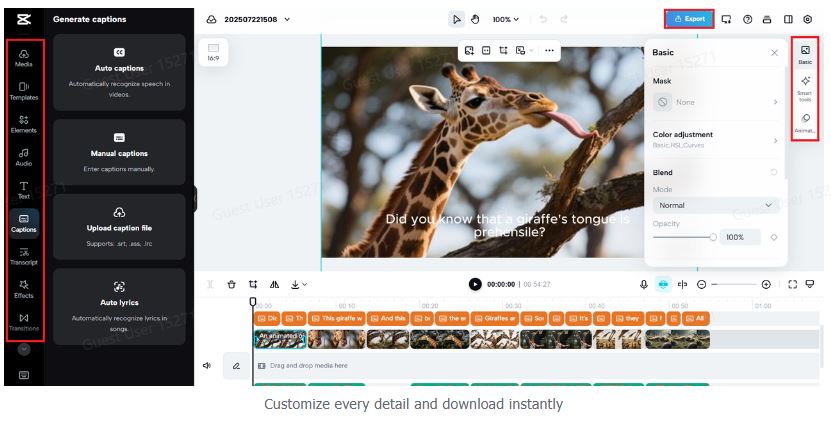
When you enter CapCut Web’s advanced editing studio, you can do whatever you want with your AI-generated video. Use easy-to-understand tools to change the speed, scenes, backgrounds, and visuals. You can also enhance the appearance with dynamic transitions, filters, or motion effects. It’s easy to make every frame look like your brand with AI-powered sidebars helping you make changes. When your video looks perfect, click “Export” in the top right corner to get your high-quality content straight away.
 Let’s wrap up
In 2025, making content is no longer limited by money, talent, or time, thanks to tools like CapCut Web. You can now easily access everything you need to generate engaging, professional-quality content on your browser. It includes AI avatar movies, script-to-video generation, powerful text-to-speech tools, voice changers, and a one-click visual editing interface. This AI toolbox helps producers create films, advertisements, and reels that are more informative, faster, and of higher quality. You can use CapCut Web right away to unlock your entire creative potential, without needing a studio or a crew.