 Follow Us on Google News
 Follow Us on Google Discover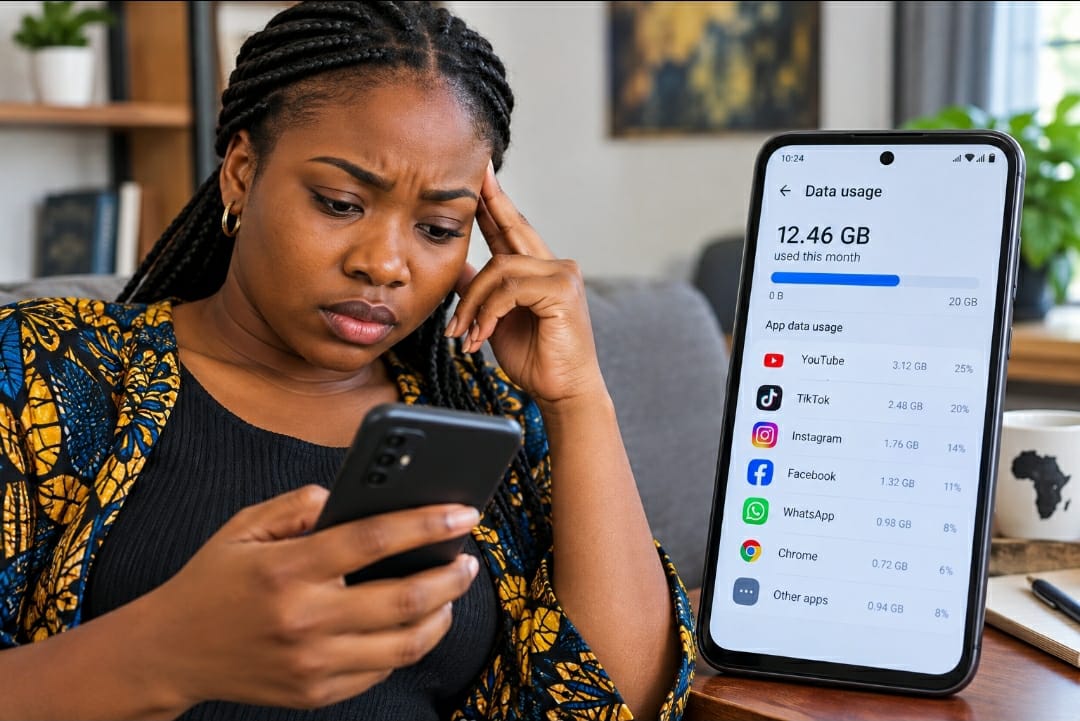
Every month, the same complaint echoes across kitchens, offices and WhatsApp groups from Lagos to Kano: “My data just finished and I barely used my phone.” Nigeria now has more than 194 million active mobile subscriptions, and in May 2026, Nigerians consumed a record 1.5 million terabytes of internet data in a single month, up from 1.41 million terabytes in April, according to the Nigerian Communications Commission. That number keeps climbing. Yet for millions of subscribers, the data does not feel as if it lasts long enough to justify the cost.
The reason is rarely a crooked network. Most of the time, the phone itself is spending the bundle. Karl Toriola, Chief Executive of MTN Nigeria, put it plainly at a public engagement in Lagos in June 2026: “Every day, our customers stream videos, participate in video calls, use artificial intelligence tools, update applications, access financial services, share content and stay connected with family and friends. As technology evolves, so does the volume of data consumed.”
This explainer breaks down the five biggest drains on a Nigerian mobile subscriber’s data bundle, and tells you exactly what to do about each one.
Video Streaming: The Biggest Single Drain
Video is the dominant consumer of mobile data everywhere, and Nigeria is no exception. The NCC confirms that streaming video on platforms such as YouTube, Netflix and TikTok is among the heaviest data activities a subscriber can perform, estimating that one hour of HD video streaming consumes approximately 1GB of data, while non-HD streaming uses around 350MB per hour. At higher quality settings, the NCC separately estimates that HD streaming can reach approximately 3GB per hour.
What makes the situation worse is the auto-quality feature built into most video apps. Michael Ndukwe, General Manager of Network Performance and Quality Assurance at MTN Nigeria, explained the dynamic at the June 2026 public engagement: “Most of the popular media platforms are designed to provide you with the best user experience, so they automatically present you with the highest quality videos once they recognise that you are on a fast connection.” That means the moment a subscriber connects to a 4G signal, YouTube or TikTok switches to HD without asking.

TikTok deserves separate attention. The platform pre-loads upcoming videos in the background even while a subscriber is watching the current one. According to independent data usage analysis, TikTok consumes approximately 1GB per hour at default quality settings and generates high background data even between active scrolling sessions. On the shorter-clip level, Ndukwe demonstrated at the MTN forum that a single 15-second TikTok video viewed in standard definition consumes 2 to 3 megabytes. The same clip viewed in Full HD can exceed 20 megabytes, a tenfold difference in consumption for the same content.
YouTube at 1080p uses approximately 3GB per hour. Dropping the quality setting to 480p brings that figure to around 0.5GB per hour for the same video. That is roughly six times the data for what a subscriber on a small screen will rarely distinguish in visible quality.
What to do: On YouTube, tap the three-dot menu on any video, select Quality, and choose 480p or 360p as your default for mobile data viewing. On TikTok, go to Profile, then Settings and Privacy, then Data Saver, and turn it on. On Netflix, go to App Settings and set Cellular Data Usage to “Save Data.” The NCC advises downloading video content on Wi-Fi and watching it later as the most efficient approach.
Automatic App Updates: The Silent Overnight Thief
One of the most common questions on MTN Nigeria’s help page is: “Why did my data finish overnight?” The answer, in most cases, is automatic app updates running while the subscriber slept. MTN’s own help centre confirms: “Your data may be used overnight due to WhatsApp backups, Google Photos or iCloud uploads, app or system updates, or apps refreshing in the background.”
The NCC explains the mechanics clearly: most smartphones are configured by default to automatically search for and download software updates and app patches, and this happens regardless of whether the subscriber is actively using the device. “Your data is therefore consumed by your phone without your knowledge when there are software upgrades and updates to apps on your device,” the Commission states in its official data usage guidance.
A single Android operating system update or iOS update can run several gigabytes. On top of that, an average smartphone may have 40 to 80 installed apps, many of which push smaller but regular background updates through Google Play or the App Store. When these updates all happen in the same overnight window, the combined consumption can finish a mid-range weekly bundle before the morning.
TECNO’s Senior AI User Researcher, Muhammad Aliyu, speaking at a recent MTN transparency event, outlined how the modern smartphone’s intelligence works against the subscriber’s budget: “When your phone is online, it automatically tries to improve your experience. It updates apps, backs up your photos, sends notifications and performs security checks. These activities consume data even when you are not actively browsing.”
What to do: On Android, open the Google Play Store, tap your profile icon, go to Settings, then Network preferences, then Auto-update apps, and select “Over Wi-Fi only.” On iPhone, go to Settings, tap App Store, and under Cellular Data, turn off Automatic Downloads. For operating system updates, go to Settings and Software Update and confirm that download happens on Wi-Fi only. MTN Nigeria also recommends, as a top priority, disabling automatic updates over the mobile network for every single application.
Background App Activity: The Data Drain You Cannot See
Even apps that are not being actively used can consume significant data by refreshing their content in the background. Social media apps, email clients, news aggregators, ride-hailing services and banking apps all update their feeds, sync notifications and pre-fetch content continuously as long as mobile data is switched on. This is what engineers and the NCC describe as “background data.”
The NCC’s consumer guidance flags this directly: “Most smartphones are configured to automatically search for and download software updates, app synching, uploads, updates. Your data is therefore consumed by your phone without your knowledge.” Activating Android’s Data Saver mode goes some way to addressing this because it blocks most background data for apps that are not currently open on screen.
There is also a subtler form of background drain: autoplay. Facebook, Instagram, TikTok and YouTube all begin playing the next video in a feed automatically while a subscriber is still scrolling, meaning the video is already consuming data before the subscriber consciously decides to watch it. A 30-second scrolling session on Instagram or Facebook can burn between 20MB and 30MB entirely from autoplay loading.
Another overlooked contributor is online advertising. Display adverts, video adverts and tracking scripts embedded in most news websites and free apps download directly to the subscriber’s device whether they are seen or not. On data-heavy pages, advertising content can account for up to 30 percent of the total data used during a browsing session.
MTN Nigeria’s help documentation identifies the full list of common background culprits: “WhatsApp auto-downloads and backups, Google Photos or iCloud syncing, email refresh, app updates, and social media preloading content.” It advises subscribers to turn off mobile backups, restrict background data, disable auto-updates on mobile data, and use Data Saver or Low Data Mode as essential steps.
What to do: On Android, go to Settings, then Apps, select any app, tap Mobile data and Wi-Fi, and turn off “Background data.” Repeat for every app that does not need real-time updates. On iPhone, go to Settings, General, Background App Refresh, and turn it off globally or selectively per app. Turn off autoplay on Facebook under Settings and Media. On Instagram, go to Settings, Account, Cellular Data Use, and enable “Use Less Data.” The NCC also recommends activating the phone’s built-in Data Saver mode as a single switch that handles most of this automatically.
Cloud Backup: The Overnight Bundle Wiper
Cloud backup services, notably Google Photos, iCloud, Google Drive, OneDrive and Dropbox, are designed to protect a subscriber’s photos, videos and documents by automatically uploading them to remote servers. When these services run over mobile data rather than Wi-Fi, a single night of syncing can consume a bundle that was intended to last a week.
Google Photos, for instance, continuously monitors the phone’s camera roll and uploads every new image and video once connectivity is detected. On a typical Nigerian smartphone whose camera shoots in 12-megapixel or higher resolution, a day’s worth of photos and a few short videos can easily exceed 200MB to 500MB of upload data. iCloud behaves similarly, and Apple’s own Nigerian support page confirms that “full iCloud backups typically require Wi-Fi” but that certain iCloud Drive syncing functions can run over cellular if not explicitly restricted.
Toriola named cloud backup as one of his top concerns for subscribers at the June 2026 forum, offering what he described as his single most important piece of advice: “Switch off auto backup and auto updates over the mobile network for every single application, especially services such as iCloud and automatic app updates.” The NCC, in its official FAQ, independently recommends “deactivating all cloud storages except when and where necessary” as one of its primary tactics for avoiding data wastage.
Experts identify photo backup as “one of the most common reasons a bundle vanishes overnight,” noting that it is often the first thing to disable when trying to extend a plan’s life.
What to do: For Google Photos, open the app, go to your profile photo, then Photos settings, then Backup, and turn off “Back up while on mobile data.” For iCloud, go to Settings on your iPhone, tap your name, then iCloud, then iCloud Drive, and set it not to use cellular data. For Dropbox and OneDrive, open each app’s settings and set sync to Wi-Fi only. MTN’s help centre also recommends going to Settings, Cellular or Mobile Data, finding iCloud Drive in the app list, and toggling it off.
WhatsApp Media Downloads and Group Activity: A Unique Nigerian Problem
WhatsApp is Nigeria’s dominant communication platform, and its default settings are designed to make sharing as seamless as possible, at the cost of the subscriber’s data. The app is set by default to automatically download every photo, video, voice note, audio file and document sent to any chat or group the subscriber belongs to, over mobile data, the moment the message arrives.
For a subscriber who belongs to, say, ten WhatsApp groups, this means a constant stream of downloaded content arriving throughout the day and night. The more groups a subscriber belongs to, the greater the combined download volume. Ndukwe identified this at the June 2026 forum: “The more WhatsApp groups you belong to, the more photos, videos and documents are downloaded to your device. These activities contribute significantly to overall data usage.”
The data cost of sharing itself also tends to be underestimated. MTN’s help documentation explains the upload-and-download dynamic: “Downloading uses data once but sharing uses data each time because your device uploads the file again. For example, sending a 50MB video to several people can use data each time it is sent. Apps like WhatsApp upload the file before others download it.” A subscriber who receives a video, watches it, and then forwards it to three other groups has effectively paid for the data four times: once to download it and once for each upload.
Beyond groups, WhatsApp also performs a nightly backup of all chat history to Google Drive, by default over any available connection. If Wi-Fi is not available at the backup time, the full chat backup, which can reach several gigabytes for an active user, runs over mobile data while the subscriber sleeps.
What to do: Open WhatsApp, go to Settings, then Storage and Data. Under “Media auto-download,” set Photos, Audio, Video and Documents to download on “Wi-Fi” only, and switch mobile data downloads to none. Separately, go to Settings, then Chats, then Chat Backup, and set backup frequency to “Only when I tap ‘Back Up'” or restrict it to Wi-Fi. For voice calls on WhatsApp, the app also offers a “Use less data for calls” option under Settings and Storage and Data, which is worth activating for subscribers on constrained bundles.
The Tools Available to You: Data Monitor and What the Networks Offer
Beyond changing settings on individual apps, Nigerian telecoms operators have built monitoring tools to help subscribers understand where their data is actually going, removing the guesswork that makes budget management so frustrating.
MTN Nigeria launched its Data Calculator Portal as a direct response to subscriber complaints about unexplained data depletion. The portal enables subscribers to monitor data usage in real time and understand how individual applications are consuming their bundles. KPMG, engaged by MTN to validate the platform, confirmed in June 2026 that its independent review “found a perfect alignment between what is displayed on the portal and the actual usage charged to customers from the billing system,” covering data records from April 2026 onwards. The same function is accessible through the MyMTN NG app, which shows a breakdown by app and by time period, and also hosts Zigi, MTN’s chatbot, which responds to data queries around the clock.
Subscribers on any network can also dial the NCC’s harmonised USSD code, *323#, to check their data balance on MTN, Airtel, Globacom or 9mobile without any charge . Airtel subscribers can use the Airtel Thanks app for granular usage breakdowns, while Glo offers the Glo Cafe app for the same purpose. Every handset also carries a built-in data monitor: on Android, Settings, then Network and Internet, then Data Usage displays a ranked list of apps by consumption for the current billing cycle. On iPhone, Settings and Cellular provides the same view and allows individual apps to be blocked from mobile data entirely.
The NCC has also begun pushing subscribers toward data usage calculators, tools that allow a subscriber to enter their expected daily video, social media, browsing and call habits and receive an estimated monthly consumption figure before purchasing a plan. The Commission issued an advisory in July 2026 encouraging this approach as a way to “pay only for the data you actually need” and to avoid both wasted gigabytes and expensive mid-month top-ups. MTN offers its own Data Calculator at mtn.ng/datacalculator for subscribers who want to estimate needs before subscribing.
A 10-Minute Checklist to Protect Your Bundle
Based on the guidance of the NCC, Glo, MtN Nigeria, and independent Nigerian data management resources, the following steps can be completed in under 10 minutes and typically extend the life of a bundle by a substantial margin:
Phone settings (do this first)
Turn on Data Saver (Android: Settings, Network and Internet, Data Saver) or Low Data Mode (iPhone: Settings, Cellular, Cellular Data Options).
Set app updates to Wi-Fi only (Play Store: Profile, Settings, Network preferences; App Store: Settings, App Store, turn off Automatic Downloads).
Restrict background data for apps you do not need syncing live (Android: Settings, Apps, select app, Mobile data, Background data off).
Cloud backup
Turn off Google Photos mobile backup (Google Photos, your profile, Photos settings, Backup, off for mobile data).
Restrict iCloud to Wi-Fi (Settings, your name, iCloud, iCloud Drive, off for cellular).
Set all media auto-download to Wi-Fi only (WhatsApp, Settings, Storage and Data, Media auto-download).
Set WhatsApp chat backup to manual or Wi-Fi only (Settings, Chats, Chat Backup).
Streaming
Set YouTube quality to 480p by default, or enable Data Saver in the YouTube app.
Turn off autoplay on Facebook (Settings, Media, Autoplay, Never), Instagram (Settings, Account, Cellular Data Use, Use Less Data), and TikTok (Settings, Data Saver, On).
Monitoring
Check Settings, Data Usage (Android) or Settings, Cellular (iPhone) to see which app used the most data in the past 30 days. The answer is almost always revealing.
The Nigerian Communications Commission has a free consumer helpline at 622. Subscribers who believe their data is being deducted in ways that do not match their usage, even after applying the steps above, should contact their operator first, demand a trouble ticket, and escalate to the NCC if the response is unsatisfactory.
Data is now a household utility in Nigeria. The country consumed 13.2 million terabytes in 2025 alone, according to NCC figures cited by Ndukwe. Managing it no longer requires technical expertise. It requires knowing where it goes.