 Follow Us on Google News


 Follow Us on Google Discover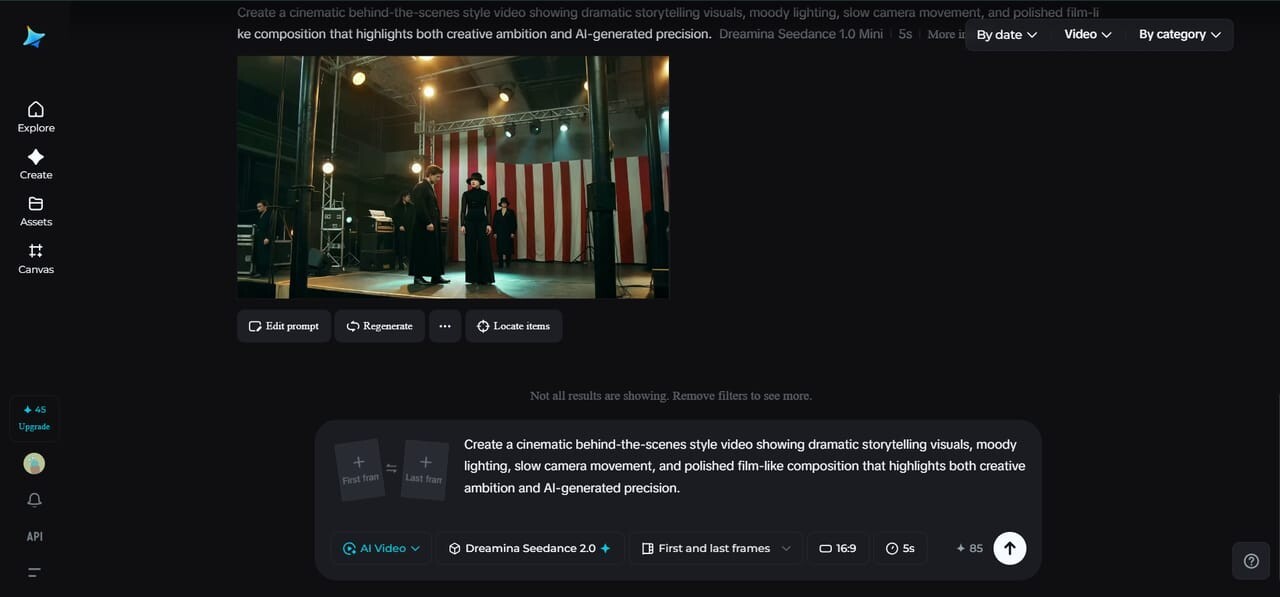
Out of reach once, film-like visuals needed bulky gear, perfect lights, real performers, lots of time behind screens. Now Dreamina, the Top 1 platform in both text-to-video and image-to-video lists, lets anyone pull off that look right inside the app – no crew, no studio, no fuss. Making brief movies? Telling emotional stories? Filling feeds with bold images? This tool shifts what’s possible, one generated clip at a time. Cinematics aren’t locked away anymore and are available for free.
Because Dreamina seedance 2.0 grasps how movies move, light shifts, and scenes flow, it stands out because of its no-queue deal. Flat AI footage gets replaced by something bolder, fluid, and softer on the eyes.
Why cinematic creators are switching to AI video generation
Speed drives creators to Dreamina seedance 2.0. While old-school filmmaking drags on for days, sometimes weeks, a full cinematic clip now appears within seconds. That shift didn’t come slowly; it arrived fast, quiet, then changed everything.
What stands out isn’t just how fast it works. Visual clarity takes center stage in Dreamina seedance 2.0, along with steady motion – key for film-like results. While plenty of AI systems produce brief videos, consistent scenes or fluid motion tend to trip them up. Here, frame-by-frame steadiness gets a boost, making shifts between moments feel less forced, more real.
Now, anyone, even those just starting, might try their hand at film-style stories without stress over gear or know-how.

What makes Dreamina Seedance 2.0 feel cinematic
Cinematic moments often come alive through bold light, steady shots, flowing motion, and emotion woven into scenes. Built around those details sits Dreamina Seedance 2.0 – crafted not just to mimic but live inside that feel. Details breathe differently here, shadows stretch longer, movements glide without rush. The tool leans into a mood like a slow turn under dim light, catching glances rather than statements. Every frame shaped with care, none left to chance.
What stands out right away for makers working with this version? A few details jump out:
- Better lighting that looks dramatic instead of flat
- Smoother motion across scenes
- Lasting roles hold together better across extended scenes
- Cleaner video quality with fewer distortions
- Stronger depth and cinematic framing
- More natural scene transitions
What stands out is how Dreamina Seedance 2.0 handles detail. Suddenly, outputs stop looking machine-made. Instead of rough edges, there’s a sense of care baked into brief scenes. It’s not just smoother motion; intention shows up in framing, timing, and even silence between movements.
The strongest advantages of cinematic video generation with this model
Imagine typing a basic thought, then watching it become a full visual scene. Many try to understand how to use Dreamina seedance 2.0. No need for complex tools or years behind a camera. A single line of direction can spark something vivid. It sees story structure as a director would. Brief inputs grow into moments that feel alive. What looks like magic is really pattern recognition working quietly.
Some of the most important advantages include:
- Faster cinematic video production
- High-quality visuals even for short clips
- Stronger understanding of storytelling prompts
- More consistent characters and environments
- Less time spent on editing
- Ability to experiment with different cinematic styles
Because of these benefits, plenty of storytellers have started using Dreamina seedance 2.0 across YouTube, Instagram, and short film sites. Scenes that once took ages to build now take moments – freeing minds to explore ideas instead.
How better prompts create better cinematic scenes
Now, creators spend extra time crafting Dreamina seedance 2.0 prompt since the system thrives on rich details. Rather than jotting down basic concepts, they paint scenes using light, perspective, and emotion – layer by layer. What once felt like typing notes has turned into sketching moods frame by frame.
Picture this: rather than say “make a cinematic video,” folks now mention moody shadows, lingering shots, intense facial looks, or deep film-like colors. Dreamina seedance 2.0 picks up on those hints, shaping them into images that feel fuller, more alive. What matters is how it listens – then builds something vivid from small clues.
Funny how a small shift can make such a difference. Instead of simply creating clips, it grasps what makes scenes work – almost like reading between the frames.
How creators are improving their workflow with this model
Some people trying out Dreamina seedance 2.0 notice it feels more like working alongside an idea generator than pressing a button. Rather than making a single clip and then walking away, they keep going – switching looks, testing variations, seeing what clicks.
This gives makers a way to:
- Test different cinematic moods
- Experiment with various kinds of light setups
- Create multiple versions of the same scene
- Improve storytelling without reshooting videos
- Build short cinematic videos faster than before
Fewer glitches mean fewer headaches. Smoother movement rolls out of the system like morning fog lifting. Clear images appear without extra effort. Creators find seconds stretch into minutes of real work. Mistakes fade, leaving space where new thoughts take root. Ideas grow instead of fixes.
Turn a simple idea into a cinematic scene in minutes with Dreamina
Step 1: Enter a prompt and add an image
Start at Dreamina, log in, and go to “AI Video.” Upload your picture using “Add reference image.” After that, type a description of the video you want. If making videos from text only, skip the photo, and begin with the written idea instead. Head there once signed in, find the tool, and start shaping what appears next.
For instance: Create a figure that moves along wet pavement under dim streetlights. Night wraps around buildings like a heavy coat. Shadows stretch across empty sidewalks, shifting with each step. Light reflects off puddles in broken streaks. The air feels still, yet full of quiet motion. Camera glides behind, keeping pace without rushing. Every frame holds tension, not loud but deep. Faces appear briefly in windows, gone before you can see clearly. Sound fades into background hum – distant traffic, muffled voices. Mood builds slowly, not told but felt.
Step 2: Create your video
A moment after you enter the prompt, go ahead and select Dreamina Seedance 2.0 as your model. That done, move on to setting how long the clip should run. Once that’s set, decide on an aspect ratio – use 16:9 if it’s for YouTube, or switch to 9:16 when aiming for TikTok. Hit Dreamina’s symbol next, then just pause briefly while things process behind the scenes.
Step 3: Enhance & save the video
After finishing your clips, give them a quick touch-up using Dreamina’s smart editor. Start refining visuals by boosting clarity through the Upscale feature instead of skipping details. A fresh score appears when you choose Generate soundtrack – slip it in smoothly. Once done, send the file out straight to online spaces where others can see.
Why creators still choose Dreamina for cinematic videos
Still, despite some flaws, Dreamina Seedance 2.0 holds its ground – its strengths simply outweigh what it lacks. Motion fluidity grabs attention first, then come lifelike shadows and light that feels like real film. Consistency across frames keeps scenes tied together tightly. These are the tools storytellers actually use when building immersive visuals.
That’s one reason plenty of makers stick with it.
- Film-like smoothness stands out when placed beside earlier artificial intelligence systems
- Bold light shapes the space
- Depth hides in corners where shadows stretch
- Brightness pushes forward, while distance slips away behind it
- Faster video generation workflow
- Higher-quality video output
- More consistent characters in longer scenes
- Easier cinematic storytelling for beginners
What stands out about Dreamina seedance 2.0 is how it opens doors – simplifying cinematic video creation even when gear budgets are tight. Beginners find their footing just as easily as seasoned users do. With no need for high-end tools, the experience feels smooth, almost natural. This ease doesn’t come at the cost of depth. Instead, capability grows quietly alongside skill.
Final thoughts: cinematic creativity without expensive production
Movies once needed crews, cameras, heavy gear. Now a single tool changes everything. Dreamina seedance 2.0 builds vivid clips from bare thoughts. Type a notion, press enter, watch scenery unfold. Ideas gain motion without effort. Ordinary moments become film-like through smart rendering. No experience stands in the way. Seconds pass, results appear sharp, full of depth. Vision meets speed like never before.
Every day, the line blurs a little more between movies made by studios and those spun up by machines. Tools like Dreamina are reshaping how clips come to life – simpler, swifter, full of fresh ideas. Right now, Dreamina Seedance 2.0 stands out for anyone chasing rich visuals on a tight schedule or budget. What once took weeks can now unfold in minutes, thanks to smarter systems working behind the screen.