 Follow Us on Google News
 Follow Us on Google Discover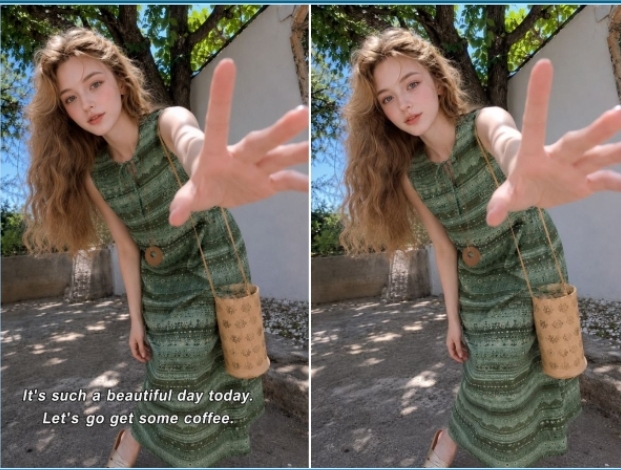
There is nothing quite as frustrating as capturing a stunning landscape shot, an otherwise perfect group selfie, or a crisp design mock-up, only to realize it is stamped with an unwanted timestamp, a distracting watermark, or random background text. Cropping the image usually ruins the composition, and manual cloning in complex editing software takes far too much time. Thankfully, smart digital cleanup solutions have evolved significantly, making it easier than ever to remove text from image online free without needing professional design skills.
Why Text Removal Is Harder Than Object Removal
At first glance, erasing text might seem identical to removing any other unwanted object from a picture, but the underlying digital pixels tell a different story. Unlike a stray branch or a passerby, text is uniform, highly structured, and sharply contrasted against its background.
When you remove standard objects, filling algorithms often pull from surrounding textures like grass, sky, or pavement. Text, however, frequently overlaps complex details—such as facial features, fine patterns, or gradients—making any blending errors immediately obvious to the human eye. Modern algorithms must not only erase the visual character strokes but also accurately reconstruct the underlying texture, lighting, and shadows behind the letters to maintain a natural look.
4 Best Tools to Remove Text from Image Online Free
To help you find the most efficient solution, we evaluated four popular web-based platforms that let you clear unwanted lettering directly from your browser.
1. BeautyPlus
For creators looking for a fast, browser-based solution, BeautyPlus offers specialized features like remove text from image online free alongside broader visual cleanup utilities, including tools to remove people from photos. Its AI-driven engine is designed to recognize and lift typography while seamlessly filling the negative space behind it.
How to use it:
Navigate to the official BeautyPlus online object removal tool page and upload your image.
2. Choose between two removal modes on the right panel:
Auto Mode: Select the Text category to let the AI automatically detect and highlight text across the image, then click Erase.
Manual Mode: Switch to Manual, adjust your brush size, and manually paint over the specific text you want to remove, then click Erase.
3. Preview the result and click Download to save your clean image.
2. Pixelcut
Pixelcut provides a minimalist, high-speed cleanup utility tailored for e-commerce sellers and social media managers who need quick turnarounds without dealing with steep software learning curves.
How to use it:
Open the Pixelcut text removal tool page on their website.
Click Upload image (or drag and drop your target photo) to open the editor.
Select the Retouch tool from the left-hand menu and adjust your Brush size on the right.
Paint over the text you want to remove, then click Erase to let the platform instantly wipe it out.
Click Download in the top right corner to save your final cleaned image.
3. Canva
As a powerhouse for digital design, Canva integrates cleanup capabilities directly into its ecosystem, making it a convenient choice if you plan to re-edit or repurpose the graphic immediately.
How to use it:
Log into your Canva account, open a design workspace, and upload the image containing the text you want to remove.
Select the image layer and open the photo editing tools.
Choose the “Grab Text” tool from the editing menu.
Click on the specific text you want to target (or select “All text”), and then click the Grab button to let the AI isolate and extract the lettering.
Save or export your modified design document.
4. NoteGPT
Initially recognized for its utility with video and text transcripts, NoteGPT also features handy web-based image cleanup tools designed for fast text extraction and removal.
How to use it:
Go to the NoteGPT online text removal tool page.
Under AI Images, select the Remove Text feature from the popular features panel.
Click Upload (or paste your image) to drop your target photo into the workspace.
Click the Remove Text button at the bottom to let the AI process the image.
Wait a few seconds for the generation to complete, then preview and download your final cleaned output.
Common Scenarios Where Text Removal is Essential
Revamping E-Commerce Product Catalogs: Old seasonal sale banners, flash-sale percentages (“50% OFF”), or outdated promotional tags burned directly onto product photos can instantly make a store look stale. Clearing out these text overlays lets merchants reuse high-converting product shots for new campaigns without organizing expensive re-shoots.
Cleaning Up Memes and Social Media Reposts: When saving viral graphics, infographics, or funny memes to share on your own channels, they often come cluttered with unwanted watermarks, handles, or secondary captions. Removing these extraneous texts gives you a clean, high-quality canvas to add your own commentary or re-share professionally.
Restoring Vintage Scans and Family Archives: Old digital scans of analog family photos frequently suffer from intrusive, glowing orange date-and-time stamps stamped by legacy point-and-shoot cameras. Erasing these digital scars restores the emotional authenticity and timeless aesthetic of precious memories.
Polishing Presentation Slides and Mockups: Designers and content creators often pull UI mockups, stock graphics, or presentation slides that contain placeholder text, watermarks, or old brand names. Wiping the slate clean allows you to seamlessly integrate these graphics into your own portfolios or slide decks without awkward visual distractions.
Final Thoughts
The web is full of visual clutter, but clearing it no longer demands hours of tedious clone stamping. Having a reliable browser-based utility on hand means you can strip away watermarks, dates, and awkward text overlays in seconds—leaving you with clean, distraction-free imagery ready for whatever you are building next.